Medical
PAR-Q positive, no clearance
Answered Yes to a bone or joint problem and has not confirmed clearance from a doctor.

For coaches whose client weeks arrive in four different places
You review check-ins, workouts and nutrition together, with factual weekly notes and flags to help you spot what needs attention. You make the decisions and record your own voice or video reply.
You can review a client's mid-week flag before their next check-in.
Your clients check in through a portal with your name and colours.
Free stays free: three clients, forever, no clock. Solo is £12 a month or $15, about what one Sunday of tab assembly costs in your own hours.
Built by a strength coach who wanted to give every client a proper review.
One client's week arrives as a check-in in the app, a workout in the log, meals scattered across a food diary. To review that client you open the tabs. To review forty clients you lose the Sunday. The coaches going through it have written it down in public:
“I still have to find workarounds and find myself reverting back to my old process (email and drives) so I feel like my money has been wasted to a certain extent”
A Sunday of tab assembly is about three hours of your week, taken from coaching and from billable work.
You can compare what you programmed with what your client logged and what they lifted last week in one row. Check their reps and effort before deciding whether to change the plan.
Now
With PTToolBox
The Week Read
You read the Weekly summary as read-only factual notes, alongside the records behind it. You decide what to discuss with your client.
Your client checks in from their own branded portal: text, voice or video, on any phone, and they can log their own sessions through it too. The check-in, the workout logs and the nutrition are together for your review, with last week beside this week. If you are bringing clients across from another app, you can paste a workout table in and review those sessions alongside their check-in.
You can also record a voice or video reply to a check-in, and it sits on their home screen the next time they open the portal. Bodyweight sets, rep ranges, AMRAP and timed work all come through intact. A Tuesday session logged on Friday lands on Tuesday. You can track DB Bench and Dumbbell bench press as one lift, keeping their PB history together.
Upper Body A
Tuesday, 17 June 2026

Exercise            Set   Weight - KG   Reps
Barbell Bench Press   1        60         8
                      2        60         8
                      3        62.5       6
Chin Ups              1    Bodyweight    10
                      2    Bodyweight     9
Seated Cable Row      1        45        12
2 45 12You can review a complaint that recurs across two check-ins in six weeks on one card, alongside any unresolved screening questions. You check the details and decide what needs a conversation or a change to the plan.
You compare her scores with her own last six weeks. A 6 out of 10 for recovery means something different for each client. You can review nine stalled lifts on one card and dismiss something you've already dealt with.
Sample data · Flags for coach review
Medical
Answered Yes to a bone or joint problem and has not confirmed clearance from a doctor.
Programming
Same weight logged for three sessions and still being trained this week. Review reps and effort before changing the load.
Recurring
Raised under physical challenges each time. Nothing logged as modified.
You can start with the flagged clients on your roster. Review an unresolved screening question or a change in training, then choose who to contact first. You can open every client's records, whether they have a flag or not.
You can check changes in a client's usual pattern before their next check-in is overdue. A longer gap or fewer logged sessions gives you a reason to ask how their week is going.
Your client can raise a mid-week flag, which you can review here until you mark it handled. You can also review the daily digest email for outstanding flags and check-ins awaiting your reply.
No other flags in this sample. Open any client to review their week.
You have more context when your clients check in regularly. Agree a rhythm with each client so you can follow up on what has changed between sessions.
With the Cadence Kit, you use a two-day audio check-in pattern: send a personal voice note, then follow up two days later. You choose what to ask and how to respond.
Most coaching-app nutrition is a food diary. The coach drags foods into a plan, the client logs what they ate. The calorie tracker on their phone already does this.
You can calculate targets with Mifflin-St Jeor, or Katch-McArdle when you have a body fat figure. You can use three tape measurements for a labelled estimate, then review meals from 557 recipes filtered to her recorded exclusions.
She gets three branded documents: a targets sheet, a meal plan, recipe cards behind a combined shopping list. Your name, your colours, your logo. They print on paper and they read on a phone.
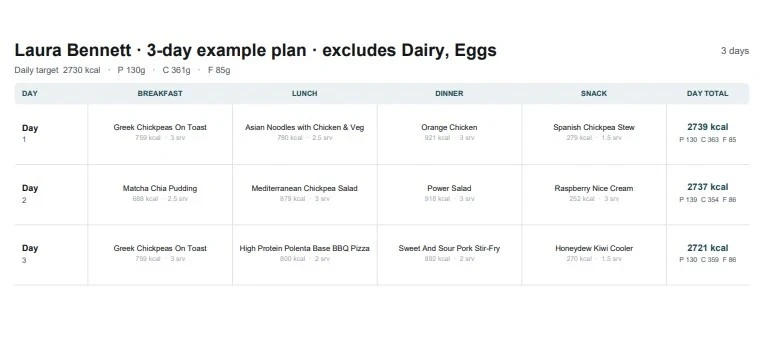
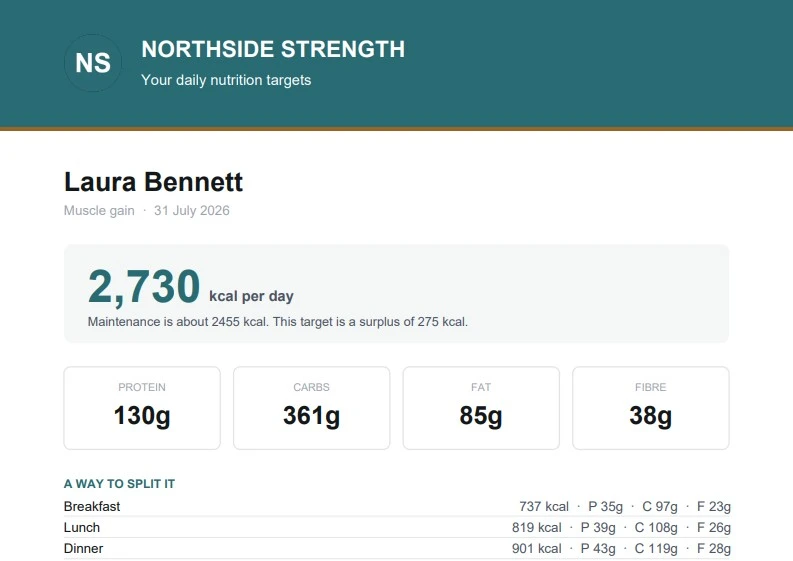
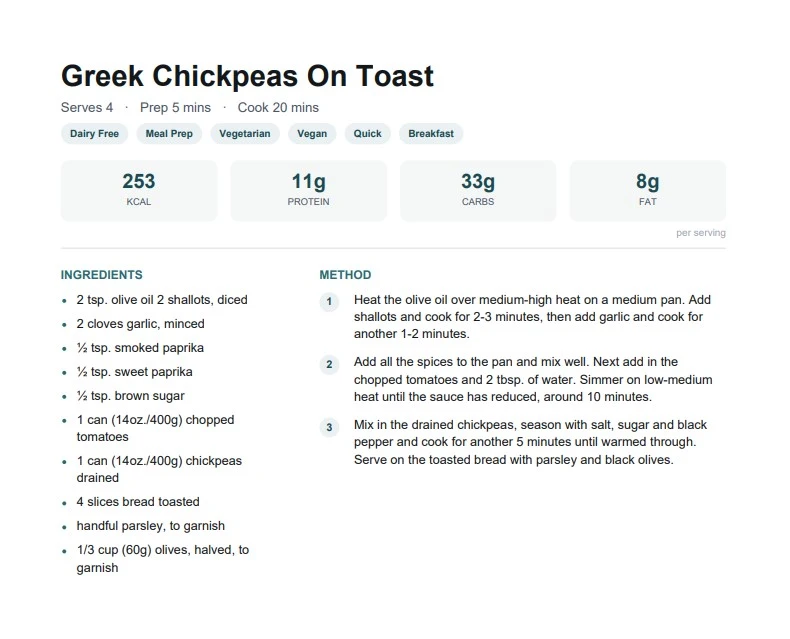
Generated by the app from the sample client above.
Programme a block of weeks at a time: phases, deload weeks and per-lift training maxes, with percentage loads that resolve to kilos against the weights they actually moved. While you program a lift, the last two sessions they did for it sit beside the row, so what you prescribe next lands where they are.
You review the session history and flags before changing a lift. You decide where to add load, where to hold and when to deload, then apply your changes to the programme.
You can cancel from billing settings and export your whole roster free on every plan. If we ever charge after a cancel, we refund double the charge.
You will not find a “trusted by 400,000 coaches” number on this page. The number would not be true yet.
“They. Will. Lose. Your. Info.”
“Messages auto delete after 30 days and there's no where to reply back to client's check-ins”
“the workout builder was frustrating and clunky”
You review each client's check-in alongside their workouts and nutrition. Use the Weekly summary and flags to prepare for the conversation, then give your client your own feedback by voice or video.
Free stays free: three clients, forever, no clock. Solo is £12 a month or $15, with the same weekly overview and personal reply tools on every plan.
Start free at 3 clientsIncluded with every account, including Free.
Every plan is the whole tool. The only thing that moves with the price is how many active clients you keep in it.
Free stays free at three clients, forever. Solo costs about what one Sunday of tab assembly costs you in your own hours.
Up to 3 clients
Up to 10 clients
Up to 25 clients
Up to 50 clients
Up to 100 clients
Annual is ten months for twelve. Prices in pounds and dollars; you will see your own currency at checkout.
If The Week Read does not pay for itself in weekend hours within 30 days, you get a full refund, and we export every client's data to the tool of your choice, free.
Both halves are real today. The export is built and available on every plan. Subscriptions run on Stripe self-serve, so cancelling takes a click, not a ticket.
Questions
You review check-ins, workouts and nutrition together, with flags for anything that may need attention. Use the Weekly summary as read-only factual notes alongside the source records, then make the coaching decisions and give your own feedback by voice or video.
Use whatever you program. For example, you can enter “Deficit Trap Bar Deadlift with a 3s eccentric” and track it across weeks as one lift. You keep your own exercise names when you review progression.
Yes. You can calculate daily targets with Mifflin-St Jeor, or Katch-McArdle when you have a body-fat figure, and choose a meal plan from a library of 557 recipes filtered to the client's exclusions. You review the plan before sharing a targets sheet, recipe cards and a shopping list, all with your branding.
You set a client's exclusions once, and the meal plan is filtered to them before any meal is chosen, so nothing they can't eat ever appears. The exclusions print on every sheet the client receives, so the constraint travels with the plan.
You see a flag when a client answers yes to a PAR-Q screening question and hasn't confirmed clearance. With injuries recorded alongside their training, you can review those constraints before deciding whether to change the plan or refer the client to a suitable healthcare professional.
You see flags based on each client's recent history, with the reason attached. Review widening gaps between check-ins, shorter answers, fewer logged sessions or scores below their usual level, then check the context and choose who to contact first.
No. Start where you are this week. Your client's first check-in through the portal sets the baseline, and the history builds from there. You see the value on day one without spending a weekend on retroactive data entry.
You see a missing-data flag on the roster when a completed workout has no weights logged. You can ask your client about the missing numbers before deciding whether to change their programme.
You can keep using it for whatever it does well. In PTToolBox, you review check-ins and training together, and calculate nutrition targets from formulas. You can paste a workout table to bring existing sessions across. Start with this week's records and decide what to move after you have tried a review.
That depends on your roster and what each client needs that week. You can review their records together and start with the flagged clients. You still read the context, make the coaching decisions and give each client your own reply.
No. A daily digest email arrives at 6am UTC with the few clients who need you that morning: a screening question left unanswered, a check-in waiting on your reply, a programme ending or finished, a flag a client raised mid-week. You read the email and decide whether to open the app. The roster is still there whenever you want it.
Yes. You can write a four-week block with phases, deload weeks, per-lift training maxes and percentage loads that resolve to kilos against what they actually moved. While you program a lift, you can see their last two sessions beside the row. You choose and apply the changes to their programme.
Through their own branded portal, on any phone. You send them a link, they tap it, and the check-in opens with your name and colours. They can answer with text, record a voice note, or film a short video. The check-in arrives on your read screen with the training data already beside it.
Yes. When you answer a check-in, you can record a voice note or a short video instead of typing. It lands on your client's home screen the next time they open the portal, with your name and colours. The check-in stays the conversation; the reply sits on top of it.
Yes. Through the same portal they check in through, they can log what they lifted that week, set by set. You review those sessions next to their check-in and the programme you prescribed, alongside any sessions you paste in from another app.
No. Your clients check in through the portal and you can review their records from the start. If you want to bring workouts across from another app, you can paste a workout table in without connecting the two accounts.
Your clients check in through their own branded portal, with your name, your colours, your logo. They see their programme, their targets sheet, their meal plan. The coaching tools live on your side.
Clients check in from their phone, in their own portal. The coach side runs on a phone too, but the Sunday read suits a laptop: comparing a week of tables works properly on a large screen.
The free plan stays free at three clients, forever, no clock. If your active roster passes three, you pick a tier by roster size, and we email you before anything on the account changes. Your data stays yours either way.
Yes. The first twenty coaches are founders. When a founder starts a paid subscription, the current price of the selected plan stays in place while that subscription remains continuously active. Founders still pay for the plan they choose. If a founder cancels and later returns, the then-current price applies. Once twenty coaches have joined the cohort, it closes.
Yes, any time. Your whole roster exports from one button on the roster page as a CSV (one row per client) and as machine-readable JSON covering clients, programmes, check-ins, workouts, nutrition and notes. There is no exit fee and nothing to call. Your client can also export their own data from the portal, and only what they submitted.
Cancel any time from your billing settings and the plan runs to the end of the period you've paid for. Plans are sized by active clients, and you get a heads-up one client before the ceiling, so nothing cuts off by surprise. If The Week Read does not pay for itself in weekend hours within 30 days, you get a full refund, and we export every client's data to the tool of your choice, free.
You use your clients' records for your coaching review, including weekly summaries and flags. Other coaches cannot see those records. Anthropic processes relevant records when you use an AI-assisted feature and does not use API data to train its models. The Security and Privacy pages explain this processing.
Yes, with the same consent you already need to coach them. You are the controller of your clients' data and PTToolBox is your processor, which the Data Processing Addendum sets out. Check-in and injury data counts as health data under UK GDPR, so a client's explicit consent matters, and the Acceptable Use Policy is where you confirm you have it. Nothing you enter trains an AI model.
Start with one client's next check-in. Review it alongside their workouts and nutrition, then record your own feedback. You can keep up to three active clients on the free plan for as long as you need.
Free stays free: three clients, forever, no clock. Solo is £12 a month or $15, about what one Sunday of tab assembly costs in your own hours.
Built by James Swift, strength coach, Neston.
Free at 3 clients, forever
The first Sunday is the free test